
Manage Your Gym Effortlessly with MM Gym Cloud

Track members, attendance, billing and performance — all from one clean, mobile-first dashboard built for gym owners.

About MM Gym Cloud

Transforming gym management with smart, simple, and powerful software solutions

Why Choose MM Gym Cloud?

We understand the challenges gym owners face in managing members, tracking payments, and maintaining attendance records. That's why we built MM Gym Cloud - a comprehensive solution that simplifies your daily operations.

  • Easy Member Management - Add, edit, and manage members with just a few clicks
  • Smart Attendance Tracking - Daily presence monitoring with quick search
  • Payment Management - Track paid and pending payments with export options
  • Bulk Operations - Import members via CSV and manage multiple entries
  • WhatsApp Integration - Send payment reminders and updates directly
  • Mobile Friendly - Access your gym management from any device
Modern dashboard designed for gym owners

MM Gym Cloud Features

Complete gym management solution with powerful features
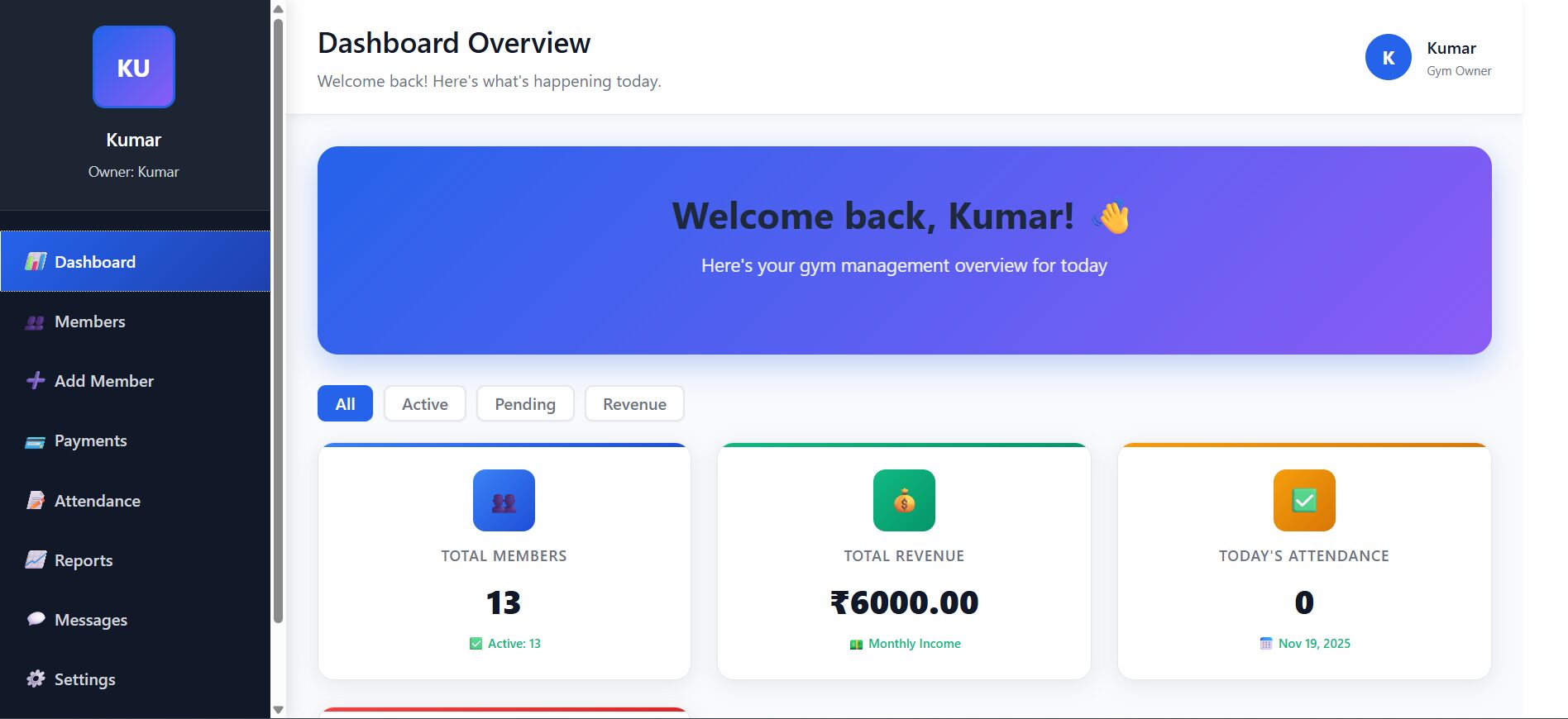
Dashboard Overview - Showing stats cards, filters and quick actions

Dashboard Overview

Your daily command center with real-time insights

📊 What You Get

Welcome section with personalized greeting for gym owners. Stats filter buttons to view data by All, Active, Pending, or Revenue views. Quick action cards for one-click access to Add Member, Attendance, Payments, and Messages sections.

🚀 How to Use

Check your daily stats as soon as you login. Use filter buttons to focus on specific data types. Click quick action cards for common tasks. Get instant overview of gym performance with real-time insights.

Member Management

Complete member profiles with advanced search and bulk operations

👥 Core Features

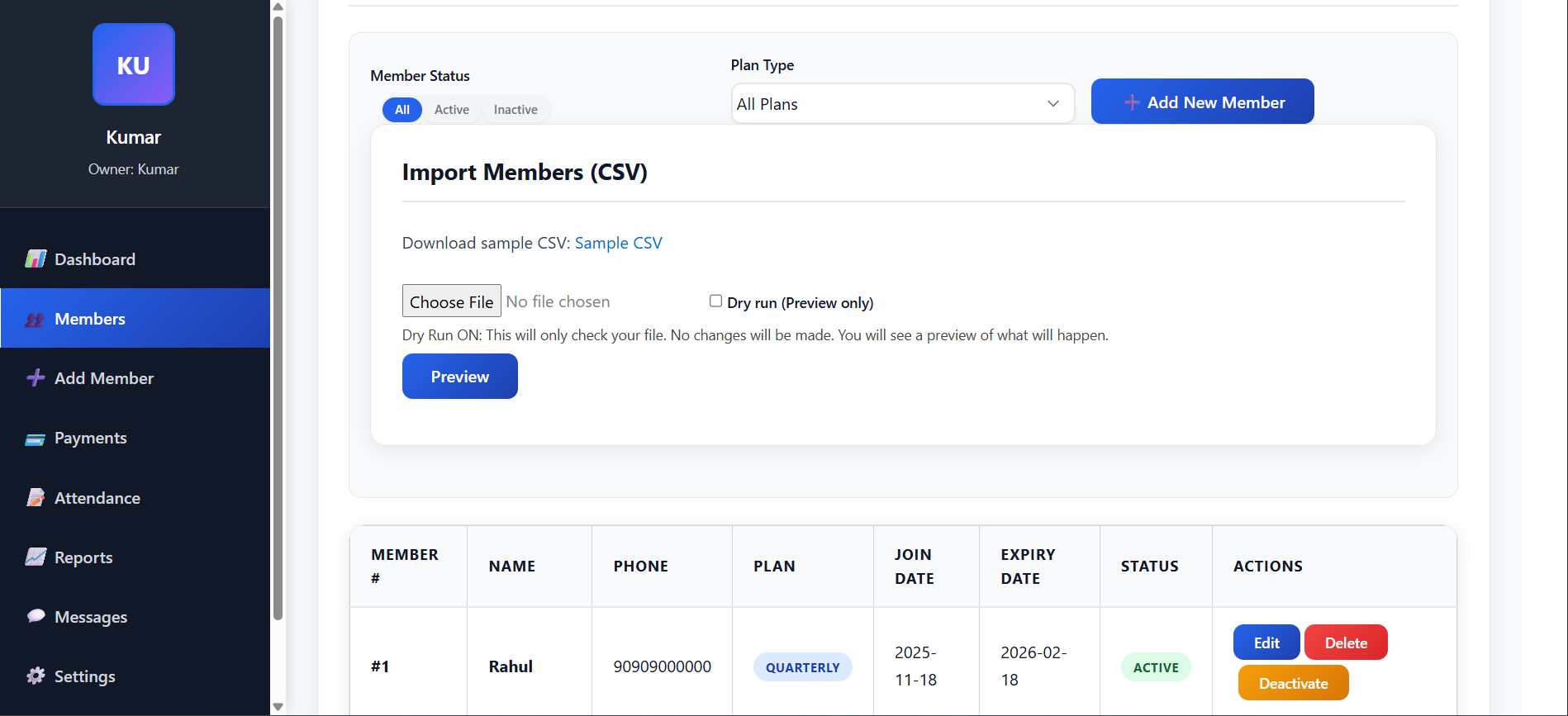
Member status filtering with All, Active, and Inactive views. Plan type filtering for Monthly, Quarterly, and Yearly members. Bulk CSV import functionality with preview mode. Detailed member profiles showing Member Number, Name, Phone, Plan, Payment Mode, Join Date, and Expiry Date.

💡 Pro Tips

Use CSV import for adding multiple members quickly. Filter by "Active" to see current membership status. Check expiry dates regularly to send renewal reminders. Use member actions for editing, renewing, or managing individual members.
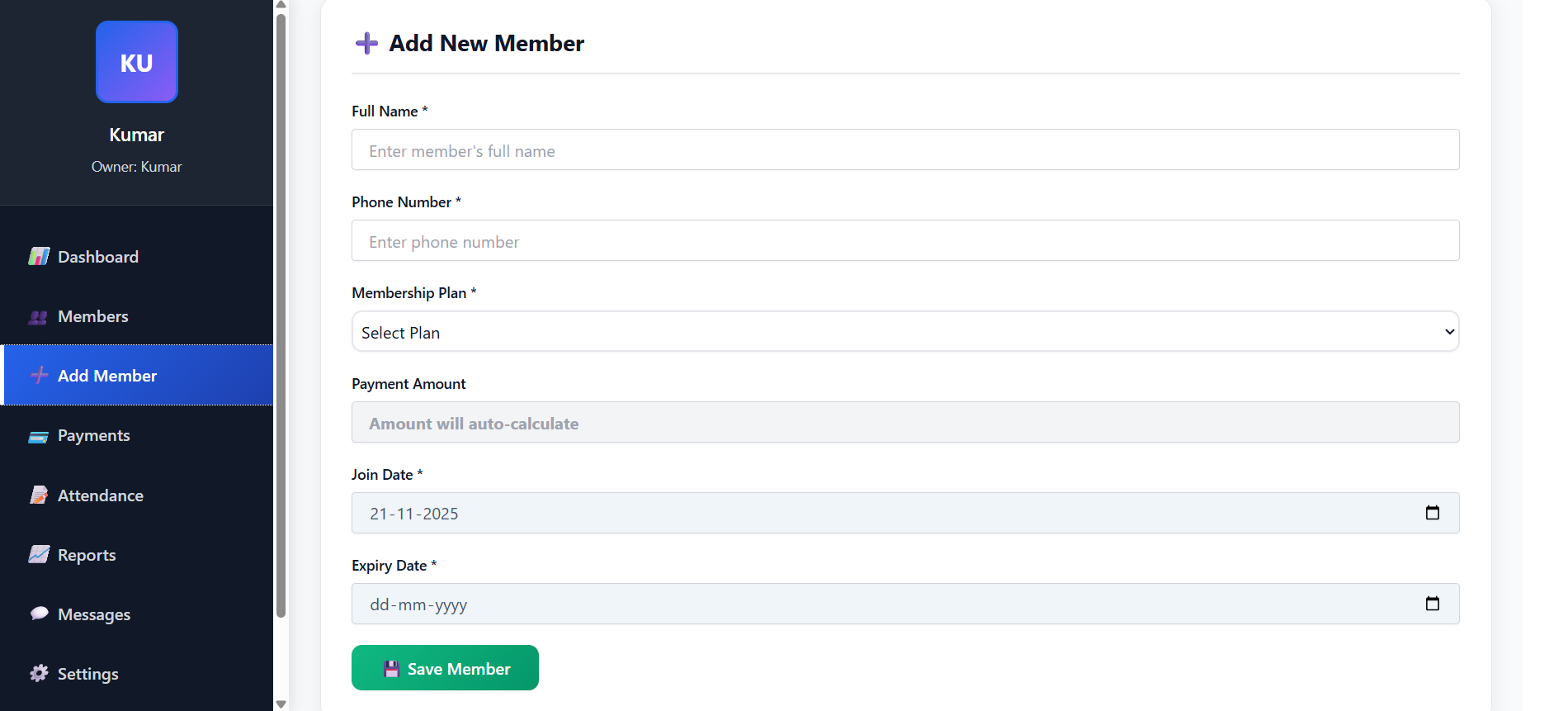
Add Member Form - Showing registration form with auto-calculated amounts

Add Member

Quick registration with smart amount calculation

📝 Registration Features

Smart form that auto-calculates payment amount based on selected plan. Payment Mode selection with Cash, UPI, and Card options. Automatic amount calculation for Monthly (₹1000), Quarterly (₹2500), and Yearly (₹9000) plans. Date management with Join Date and Expiry Date fields.

⚡ Quick Steps

Fill basic details including Name and Phone number. Select membership plan from available options. Choose payment mode for record keeping. Amount auto-calculates based on chosen plan. Set join date and expiry date, then save to instantly add member.

Payments Management

Complete financial tracking with export capabilities

💰 Financial Features

Payment summary cards showing Total Received, Total Pending, Today's Collection, and Paid/Pending counts. Smart filtering by All, Pending, Paid, and Expiring status. CSV export functionality for accounting purposes. Payment tracking showing Member Number, Name, Plan, Payment Mode, Amount, Due Date, and Status.

📈 Revenue Insights

Track daily collection trends and identify payment patterns. Quickly identify pending payments that need follow-up. Export data for tax purposes and financial reporting. Monitor payment status and expiring memberships for proactive management.
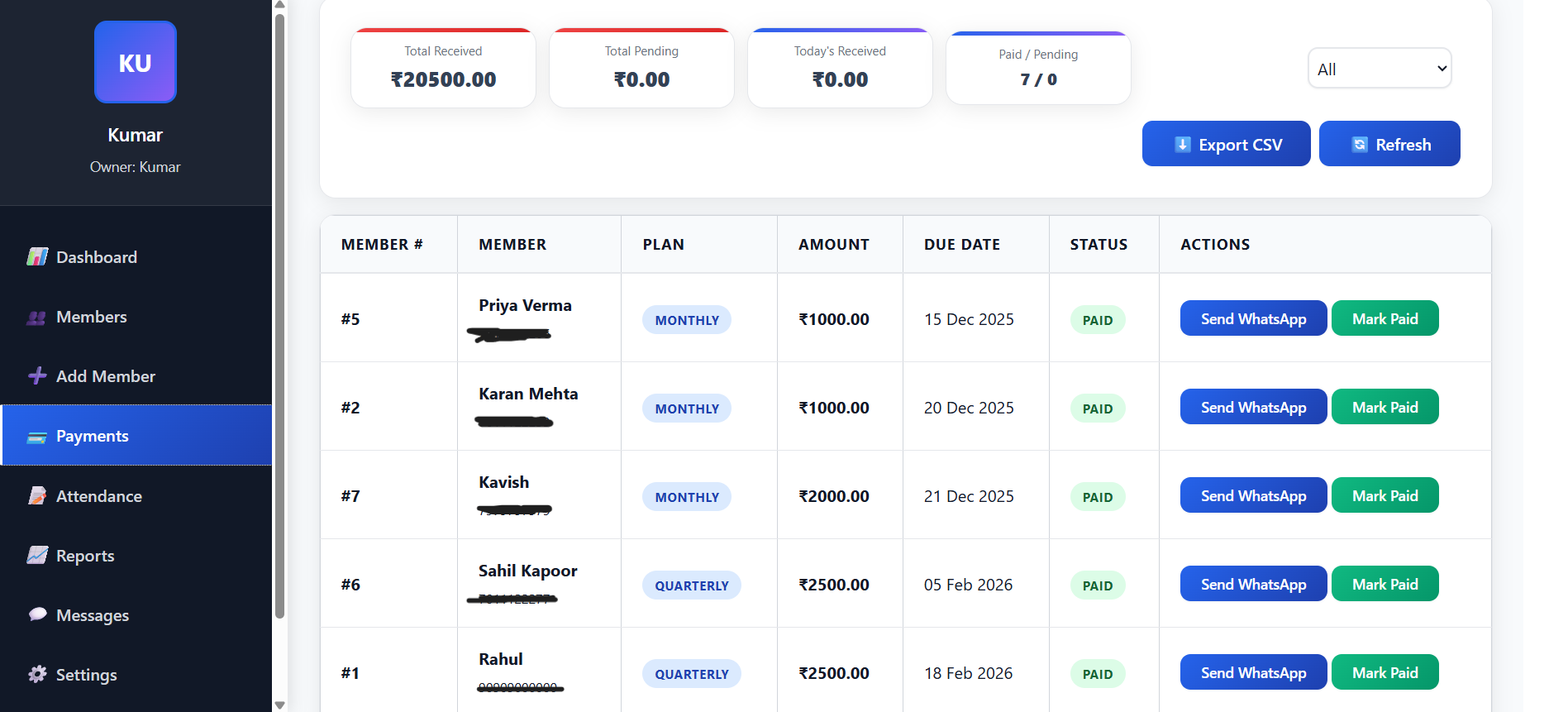
Payments Dashboard - Showing payment summary and transaction list
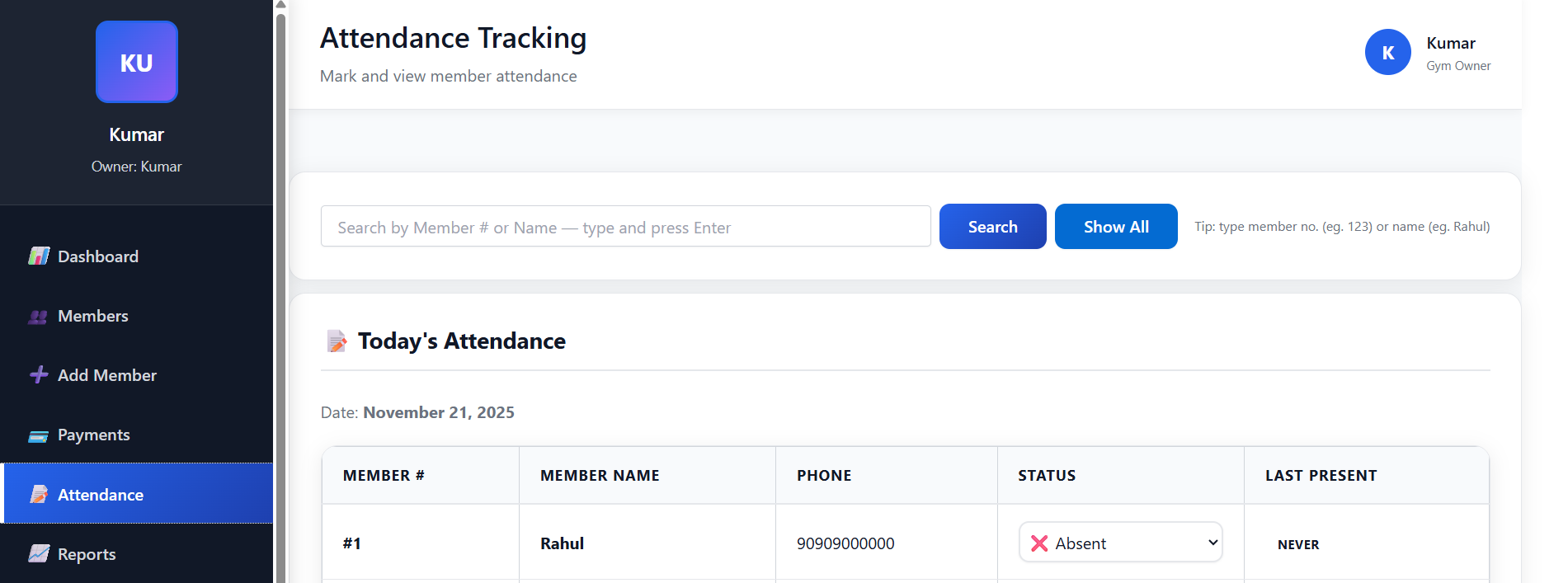
Attendance Tracking - Showing today's attendance with present/absent status

Attendance Tracking

Daily presence monitoring with search functionality

📅 Tracking Features

Search functionality to find members by Member Number or Name. Today's attendance marking for present/absent status. Last Present tracking to see when member last visited. Bulk operations to save attendance for all members at once. Clear date display showing current attendance date.

🎯 Best Practices

Take attendance at gym opening time for accurate records. Use search functionality for large member lists. Review attendance patterns regularly to identify trends. Save attendance data to track member engagement and gym usage patterns.

Reports & Analytics

Comprehensive reporting with date-range analysis

📊 Reporting Features

Date range reports with customizable start and end dates. Monthly analysis to view data by specific months. Member-specific reports filtered by individual members. CSV export to download detailed reports for offline analysis. Summary statistics for quick overview of key attendance metrics.

📈 Analytics Insights

Track member attendance patterns and gym usage trends. Analyze attendance data by specific date ranges. Monitor individual member attendance records. Generate comprehensive reports for business analysis and decision making.
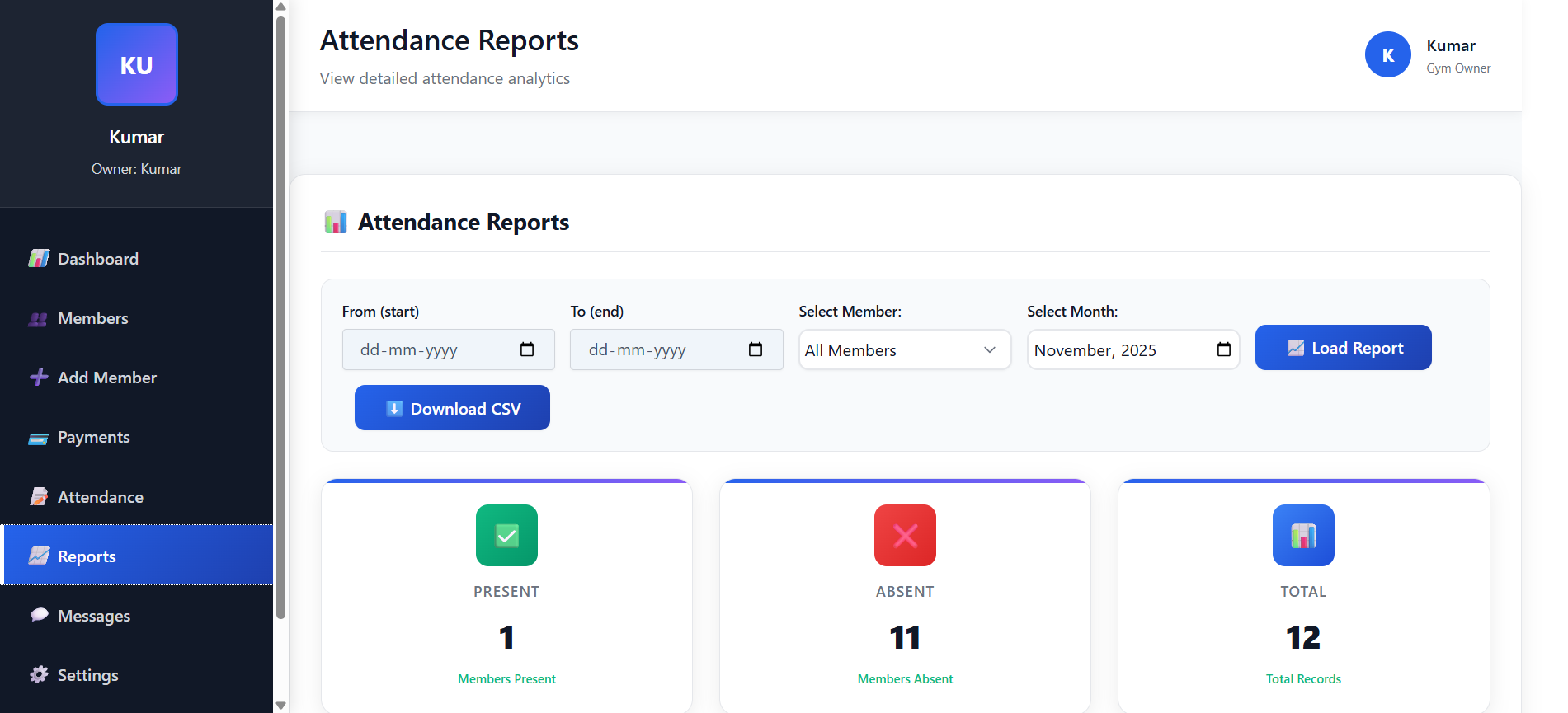
Reports Dashboard - Showing analytics and export options
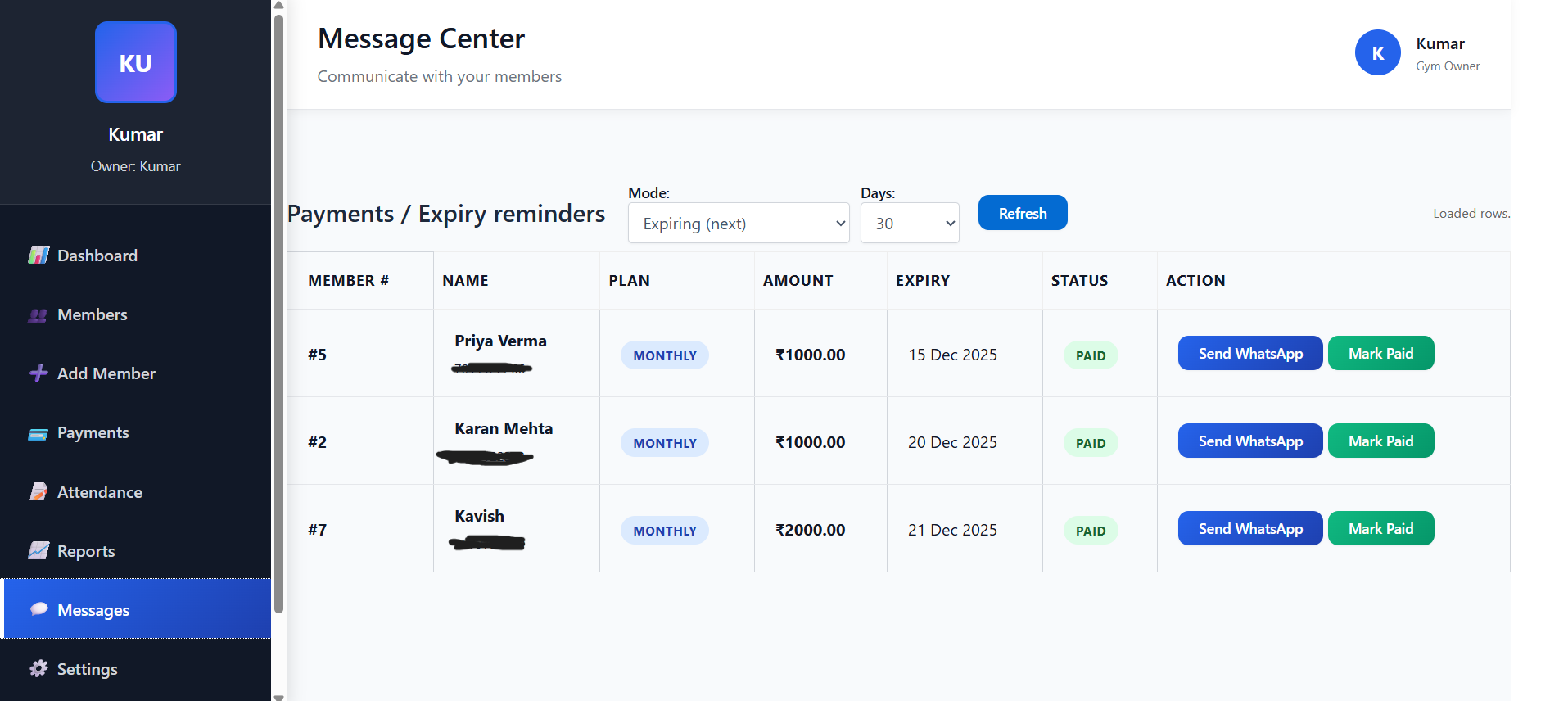
Messages Center - Showing payment reminders and expiry alerts

Messages & Reminders

Automated reminders for payments and renewals

💬 Communication Features

Payment reminders for members with pending payments. Expiry alerts for upcoming membership expirations. Customizable reminder windows with 3, 7, 15, and 30 day options. Status tracking for expired vs expiring members. Member details including Member Number, Name, Plan, Payment Mode, Amount, and Expiry Date.

🔔 Smart Reminders

Set appropriate reminder periods for membership renewals. Send payment due notifications automatically. Track member payment and expiry status efficiently. Streamline communication processes for better member retention.

Settings & Plans

Complete gym customization and plan management

⚙️ Configuration Features

Gym profile setup with gym name and logo upload functionality. Membership plans management for creating and editing plans. Custom plans with ability to set plan names, amounts, and periods. Owner-specific settings where all configurations are gym-specific. Plan integration that automatically appears in Add Member section.

🎛️ Setup Guide

First, set up your gym profile with name and logo. Then create membership plans with appropriate pricing. Plans will automatically appear in Add Member section for selection. Configure payment modes and plan periods as per your business requirements.
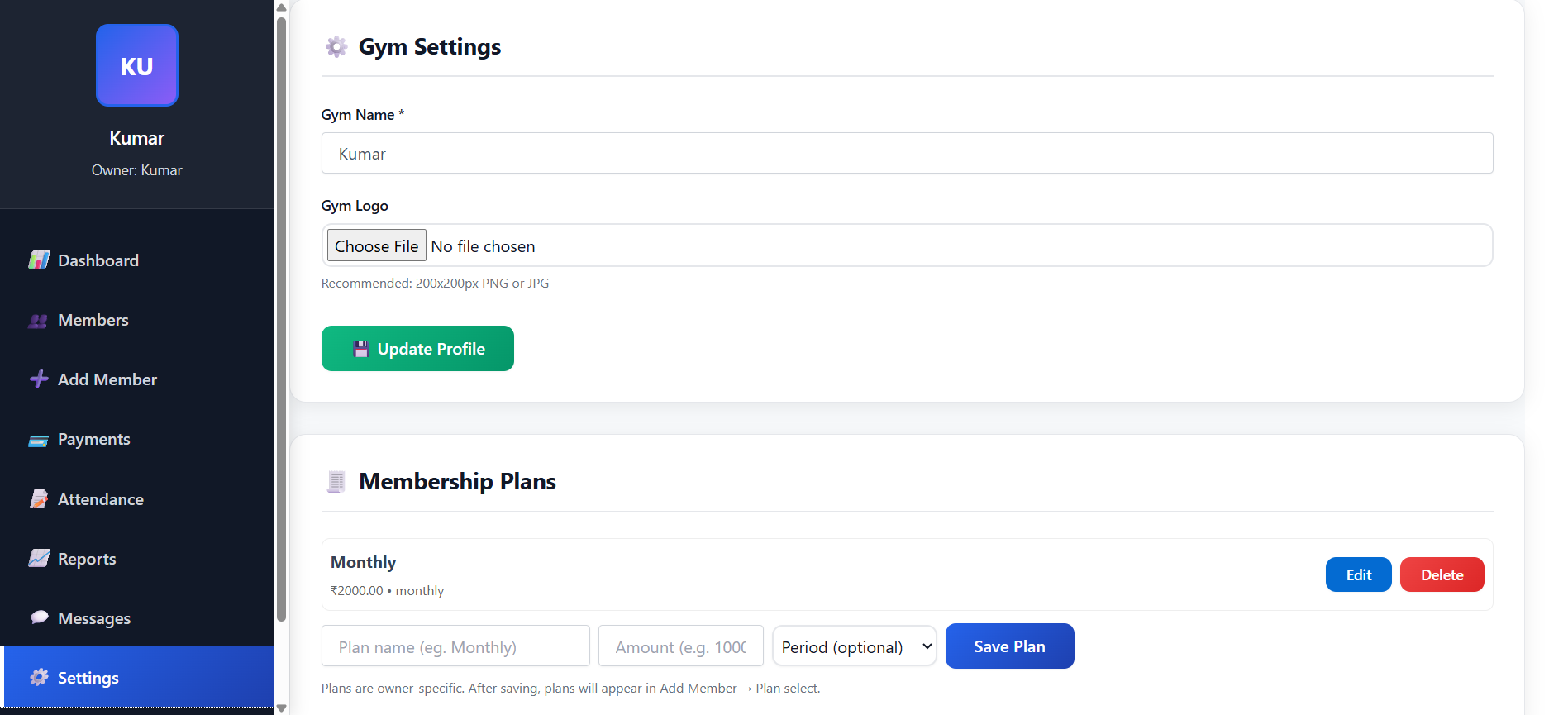
Settings Panel - Showing gym profile and plan management

Simple Pricing — No Monthly Plans

After your 28-day demo expires, choose from our affordable long-term plans. Special discounts for early adopters!

Note: Demo accounts have full feature access for 28 days. When the trial ends, choose a plan to continue.

15% OFF

12 Months Plan

₹3,600
₹3,060 /12 months
Special 15% discount for first 100 gym owners!

Pay once → access for 12 months

  • All features active for 12 months
  • Set-and-forget billing
  • Unlimited everything
  • Premium support
  • Custom feature requests
  • Dedicated account manager
  • Save 15% with early bird offer

Important — Demo & Reactivation Process

  • Demo Access: During the 28-day demo period, every feature is fully available at no cost for evaluation.
  • When Demo Ends: Your demo account will be paused. Choose a plan to continue using the system.
  • Special Discounts: First 100 gym owners get 25% off on 6-month plan and 15% off on 12-month plan.
  • Payment Options: We accept UPI, Bank Transfer, and other digital payment methods.
  • Activation: After payment confirmation, we'll immediately activate your account for the chosen duration.
  • Support: All paid plans include dedicated support via WhatsApp and email.

Frequently Asked Questions

Find answers to common questions about MM Gym Cloud

The demo gives you full access to all features for a limited time:

  • Complete dashboard with all statistics
  • Unlimited member management
  • Attendance tracking and reporting
  • Payment management system
  • Manual WhatsApp messaging

When the demo ends, contact us via WhatsApp to reactivate with your chosen plan.

After your demo period ends:

  • Your account access will be temporarily paused
  • All your data is safely preserved
  • Contact us via WhatsApp to choose a plan
  • We'll immediately restore full access after payment
  • Continue right where you left off

Yes! We provide bulk CSV import functionality:

  • Download our sample CSV template
  • Fill in your member data
  • Use dry-run mode to preview imports
  • Import multiple members in one go
  • Auto-detect data errors

Our attendance system is designed for quick daily use:

  • See today's attendance status for all members
  • Quick search by name or member number
  • Mark present/absent for multiple members
  • See when each member last visited
  • One-click save for all attendance

Our messaging system helps you send reminders manually:

  • View members with pending payments
  • See upcoming membership expiries
  • Click "Send Message" button next to each member
  • Pre-written template opens in WhatsApp
  • You review and send the message manually

Note: Messages are sent manually by you, not automatically.

Yes! You can create and manage custom plans:

  • Create plans with custom names and prices
  • Set monthly, quarterly, or yearly durations
  • Plans auto-appear in Add Member form
  • Auto-calculate payment amounts
  • Edit or delete plans anytime

Not at all! Designed for gym owners:

  • Simple, intuitive interface
  • No coding or technical skills required
  • Step-by-step guides
  • Visual icons and clear labels
  • One-click operations

Absolutely! Works on all devices:

  • Mobile phones (Android and iOS)
  • Tablets
  • Desktop computers
  • Automatically adapts to screen size
  • No app download needed

We provide quick support:

  • WhatsApp Support: Quick responses
  • Email Support: Detailed help
  • Setup Assistance: We can help you get started

Most questions answered within 30 minutes.

We accept various payment methods:

  • UPI Payments (PhonePe, Google Pay, PayTM)
  • Bank Transfer (NEFT, IMPS)
  • Digital Wallets
  • QR Code Payments

Still have questions?

We're here to help! Get quick answers via WhatsApp.

Scroll to Top